
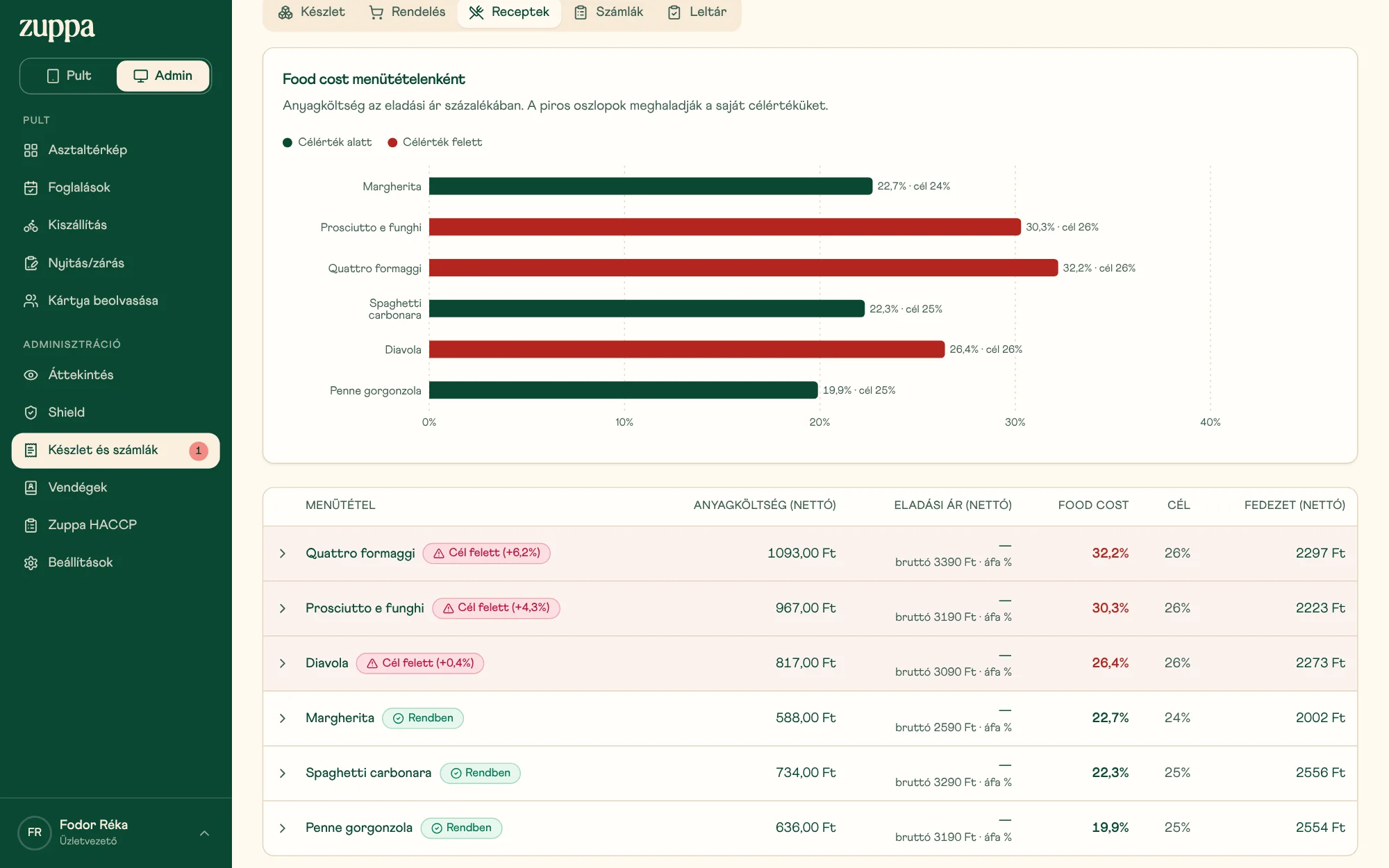
See what every plate earns, dish by dish.
Photograph the supplier invoice and your stock updates. Say the recipe out loud and the portion cost is ready. Every dish shows its net food cost, and Zuppa tells you when something got pricier.
Purchase prices move every week. Menu prices don’t.
Suppliers raise prices quietly and the menu price stays put. If you can’t see what a portion costs, dish by dish, it takes months to find out which dish earns less than you thought.
You calculate food cost in Excel, if at all.
Recipes calculate from your stock, with the latest purchase price, dish by dish.
Invoices are typed in by hand, or not at all.
One photo of the invoice, review, approve. It understands Hungarian pack sizes.
You don’t notice when a supplier raises prices.
Every invoice is compared with earlier prices, and you are told when one goes over your limit, along with the dishes it affects.
Stocktake eats a whole Sunday afternoon.
Stocktake on your phone, shelf by shelf, and the order list builds itself by supplier.
A worked example
- Net selling price of one dish
- HUF 3,900
- Food cost today
- 32%
- After a price or recipe change
- 29%
- Per plate
- HUF 117
- At 800 portions a month
- HUF 93,600
That is one dish. The module costs HUF 14,950 (excl. VAT) / month.
Example figures. For your own dishes, Zuppa calculates it exactly.
Food cost per dish, calculated from net prices.
It calculates from net purchase prices, so VAT doesn’t distort the number. Set a target, and a dish turns red when it goes over. Next to it, the suggested gross selling price.
- Targets per dish or per categoryA good number for pizza is not the same as for wine.
- Red flag above targetNo hunting for the dish that needs attention.
- Suggested selling price for your targetYou see what to charge to hit your target.
Stock from invoice photos: take a photo, review, approve.
Paper invoice, delivery note, market receipt or PDF. Zuppa reads the lines, matches them to your ingredients, and flags anything worth a second look.
- Understands Hungarian pack sizes (“1kgX12db”, “12x1lit./krt.”)No working out how much is in a carton.
- Price alert above your limitYou hear about a price rise on the day of the invoice, not at month end.
- Expiry dates go to the HACCP listNothing gets typed in twice.
- Monthly invoice allowance, extendable by 100The fee fits your volume.
Recipe cards from dictation, with portion cost.
Press “Dictate” and say it the way you would in the kitchen: “one portion of spaghetti, 12 dkg guanciale”. It becomes a recipe card with the portion cost and a suggested selling price.
- Understands kitchen language, decagrams and pinchesThe chef cooks instead of typing.
- Portion cost from the latest invoicesWhen something gets pricier, the recipe cost follows.
- The chef writes recipes, the owner sees the pricesPricing stays in your hands.
Stocktake on your phone, order list by supplier.
Stock level, average price and value for each ingredient, all net. Anything below its minimum goes onto the order list, grouped by supplier.
- Stocktake on your phone, with searchOne person, one phone, in front of the fridge.
- Minimum level per ingredientYou don’t find out on Friday night that the mozzarella ran out.
- Stock value, netYou know how much money is sitting on the shelves.
What flows through on its own.
Stock and food cost is not a separate program. What happens here shows up in the other modules too, with nothing to carry over.
How much does it cost?
Monthly fee excluding VAT, no minimum term. Cheaper in a bundle.
Included in: POS Companion (HUF 30,950 (excl. VAT) / month), Zuppa Pro (HUF 74,950 (excl. VAT) / month).
Frequently asked questions
What restaurant owners ask most before they start. If your question isn’t here, request a quote and we will talk it through.
How does Zuppa calculate food cost?
From the dish’s recipe and the latest net purchase price of each ingredient it works out the cost of one portion and divides it by the dish’s net selling price. When an invoice brings a new price, the number updates by itself.
Is the number net or gross?
Food cost and margin are always calculated from net prices; the suggested selling price is gross.
Which invoices can it read?
Paper invoices, delivery notes, market receipts and PDFs. Take a photo with your phone or upload the file. Where it isn’t sure about a line, it flags it for you to check.
How many invoices can I scan a month?
The Stock module includes 20 invoices a month, the Zuppa Pro bundle 50. If you need more, add 100 at a time.
Does it go in automatically, without checking?
No. You approve every invoice. Zuppa flags what it isn’t sure about, so you only check those lines.
What about invoices in the tax authority’s system?
Today you photograph the invoice or upload the PDF: one photo and it goes through.
Can you move over my Excel sheet?
Yes. We take over your existing ingredient and recipe lists and go through them with you during onboarding.
How long does it take to enter the recipes?
A dish takes a few minutes to say. We go through the first recipes with you during onboarding, so a menu is in within an afternoon.
What if it mishears the dictation?
Anything it isn’t sure about is highlighted and it asks. You review everything before saving.
Do I need the Zuppa POS for this?
No. Stock, recipes and food cost work next to your current POS. The Zuppa POS launches in 2027; from then, sales also deduct ingredients.
Works together with
Shall we start?
- A 20-minute call
We look at what you use now, and what is missing.
- We set it up with you
We load your menu and recipes, set up HACCP and train your team.
- Your numbers, every week
You take photos and approve them. Zuppa does the maths and puts the week together.